Ask an LLM about something that happened last week and it’ll either guess or just make something up. Confidently, too. That’s the problem a RAG agent solves — it gives your AI a way to actually look things up before it answers, instead of running purely on whatever it memorized during training.
If you’ve ever shipped a chatbot that sounded sure of itself and was still wrong, you already know why this matters.
What Is a RAG Agent, Exactly?
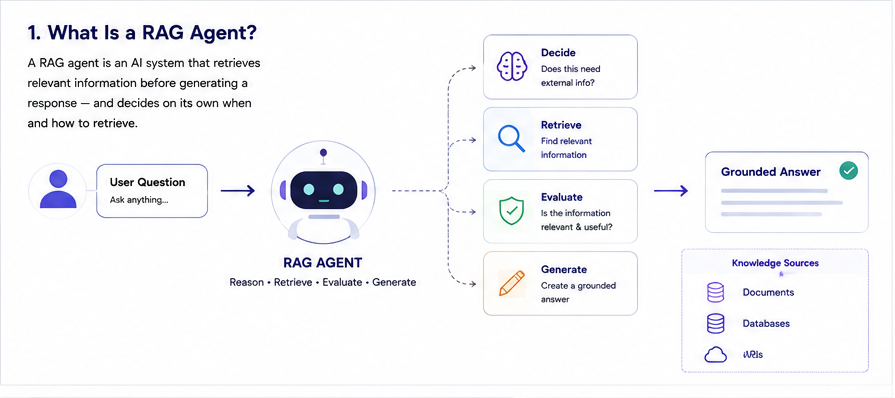
A RAG agent is an AI system that retrieves relevant information before generating a response — and, crucially, it decides on its own when and how to retrieve. A basic RAG pipeline just follows one fixed path every time. A RAG agent doesn’t. It reasons through the problem first. Sometimes that means re-searching. Sometimes it skips retrieval entirely. Sometimes it calls a tool instead.
Vending machine vs. assistant, basically. One dispenses. The other figures out what you actually need. That reasoning layer is the thing that separates a real agent from plain Retrieval Augmented Generation — not just a fancier name for the same thing, an actual architectural difference.
How a RAG Agent Actually Works
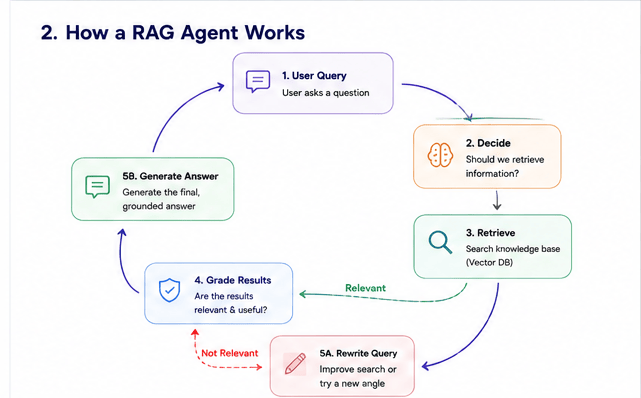
It runs on a loop. Not a straight line, a loop. Query comes in, the agent decides whether it needs outside info, retrieves if so, then checks whether what it found is even any good. Only after that does it generate an answer.
That checking step is everything. A static pipeline retrieves once and just hopes. An agent can look at what it pulled back, realize it’s weak, and go try again with a different angle. Closer to how a person researches something than how a script runs top to bottom.
You need three things for this loop to hold together: a retriever wired to a vector database, an LLM that can reason about what it’s looking at, and some way of tracking state across the back-and-forth. Skip any of those and the agent either can’t find decent context or forgets what it already tried five seconds ago.
(Loop diagram above — query, retrieve, grade, generate, with the retry path built in.)
A Quick Example: RAG Agent in Action
Say someone asks a support bot, “Why was I charged twice this month?” A static pipeline would search “double charge,” pull back a generic billing FAQ, and answer with something vague. Not great.
A RAG agent handles it differently. It first checks whether this needs account-specific data, not just docs. It queries the billing system, gets back two charges on the same date. It then checks whether that actually looks like a duplicate or two separate legitimate charges, maybe a subscription renewal plus a one-time purchase landing the same day. Only then does it generate an answer, and it’s specific: which two charges, what each one was for, whether a refund applies.
That extra reasoning step is the entire value proposition. It’s the difference between “here’s an FAQ link” and “here’s what actually happened to your account.”
RAG Agent vs. a Regular RAG Pipeline
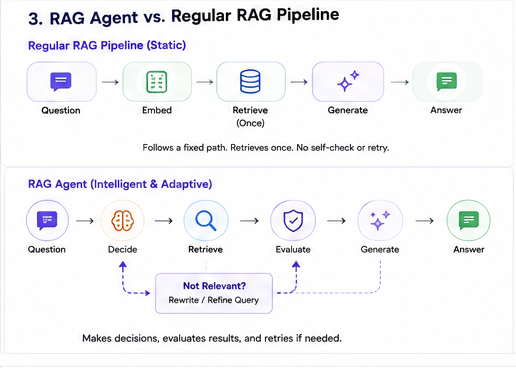
A regular RAG pipeline is pretty dumb, in a good way. Embed the query, pull matching docs, hand them to the model. Fine for simple lookups. Falls apart the second a question needs more than one search or any actual judgment call.
A RAG agent bolts a decision layer on top of that. It can route to a different data source. Break a big question into smaller ones. Decide retrieval isn’t even needed for this one. That flexibility is exactly why agent orchestration exists in the first place, something has to manage all those branches, or the whole setup turns into spaghetti fast.
(Comparison diagram above — static pipeline on top, RAG agent below it.)
Common RAG Agent Frameworks
Most teams don’t build the reasoning loop from scratch. They reach for an AI agent framework instead. LangChain and LangGraph are the two most talked about right now, LangGraph in particular because it models the loop as an actual state machine, which fits how a self-checking RAG agent behaves. CrewAI takes a different angle, focused more on coordinating several agents than perfecting one retrieval loop.
Where a lot of these frameworks get heavy is the glue code. You still end up wiring your own vector store, your own model provider, your own logging. That’s the gap DNotifier was built to close, one SDK across multiple models, so the framework question becomes less about which library and more about which features you actually need.
Why Memory and State Actually Matter Here
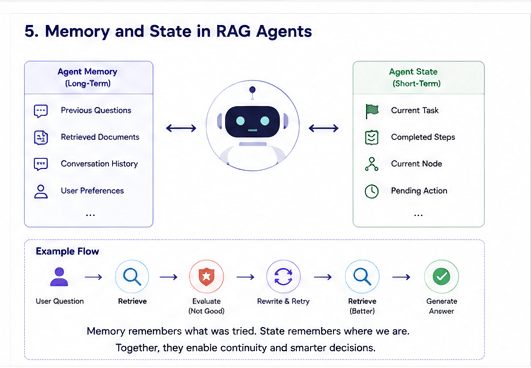
No memory, no continuity. The agent forgets everything the second it answers, and every follow-up starts from zero. Annoying in a real conversation. Users notice immediately.
AI agent memory keeps track of what’s already been retrieved, what worked, what the user already asked. State management takes it further, tracking where the agent actually is inside a multi-step task, so a failed search halfway through doesn’t mean starting over from scratch.
Honestly, this is where most DIY builds quietly fall apart. Memory and state sound simple right up until you’re the one debugging why your agent asked the same question twice.
The Building Blocks You Actually Need
Build a RAG agent from scratch and you’re stitching together a vector database, an LLM provider, a retrieval layer, plus some kind of orchestration logic to hold it all together. Each piece is fine on its own. Getting them to actually talk to each other cleanly, that’s the hard part, and it’s where most of the build time goes.
This is where DNotifier comes in. One SDK, one API, multiple models, so you’re not rewriting integration code every time you swap providers. Semantic search handles retrieval against your vector database directly. AI orchestration manages the retrieve-grade-generate loop so you’re not hand-coding every branch yourself.
(Architecture diagram above — app, SDK, orchestration layer, then the data layer at the bottom.)
Common Mistakes When Building a RAG Agent
A few things trip up almost every first attempt. Worth knowing before you hit them yourself.
Chunking documents too large or too small. Too large and the retriever pulls back noise along with the answer. Too small and it loses context the agent actually needed.
Skipping the grading step entirely. A lot of “RAG agents” out there are just pipelines with extra steps, because they never actually check if what they retrieved was relevant before generating.
No observability. When the answer’s wrong, you need to know if retrieval failed or the model just reasoned badly. Without logging each step, you’re guessing.
Treating the agent as stateless by accident. If a session resets between messages, you’ve built a slightly smarter static pipeline, not an agent.
When One RAG Agent Isn’t Enough
Sometimes a single RAG agent can’t cover the whole job. A research task might need one agent pulling sources, another summarizing, another fact-checking the summary against the originals. That’s when you’re looking at a multi-agent platform instead of a single agent, essentially a small team of specialized agents passing work between each other.
This adds real complexity, coordination, shared state, sometimes conflicting outputs that need reconciling. Not something to reach for by default. Start with one well-built RAG agent. Split it up only once you can point to the specific step that’s overloaded.
Getting a RAG Agent Into Production
Works great in the demo. Then production traffic hits and things get weird, retrieval quality drifts as your data changes, latency creeps up, and when something breaks you’re stuck guessing which step actually failed.
That’s what AI observability and traceability exist for. DNotifier logs every step in the loop, so a bad answer traces straight back to a bad retrieval instead of forcing you to reconstruct what happened. Real-time monitoring flags slowdowns before your users do. Skip this part and you’ll find out the hard way why so many production AI agents never quite match their demo.
FAQ
Is a RAG agent the same as a chatbot?
No. The chatbot’s the interface. The RAG agent is the reasoning underneath it, deciding how to find and use information before it ever responds.
Do I need a vector database to build a RAG agent?
Pretty much always, yes. It’s how the agent finds relevant context, that’s the entire point of RAG.
Can a RAG agent work with multiple LLM providers?
Yes, especially with a unified SDK. DNotifier’s multi-model setup means swapping providers doesn’t mean rebuilding your retrieval or orchestration logic.
How is a RAG agent different from an AI agent that doesn’t use RAG?
A general AI agent might use tools, memory, and planning without ever touching a knowledge base. A RAG agent specifically adds retrieval into that loop, grounding its answers in real documents instead of just reasoning from the model’s training data.
Do I need multiple agents, or is one RAG agent enough?
One, almost always, to start. Multi-agent setups add coordination overhead that’s only worth it once a single agent is clearly overloaded on one specific step.
Is DNotifier good for production RAG agents?
Yes, observability, traceability, and monitoring are built in specifically to keep agents reliable once they’re live, not just impressive in a demo.

