Building AI apps shouldn’t feel like gluing ten broken tools together. If you ever tried hooking an LLM to your private docs, you know the pain. You set up chunking, configure a vector database, and manage model APIs. Then something breaks, and you have no idea where the prompt failed.
If you are wondering, “How Do I Build a RAG Application With DNotifier?”, you came to the right place. DNotifier handles vector indexing, prompt management, and AI orchestration in one platform. You can launch a production RAG application without writing hundreds of lines of glue code.
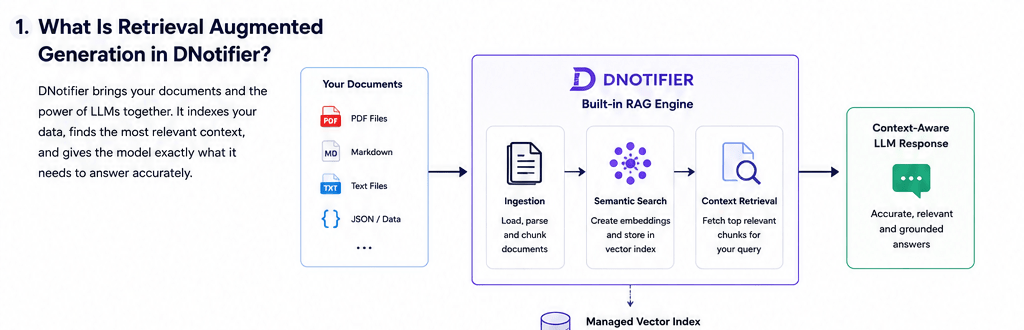
What Is Retrieval Augmented Generation in DNotifier?
Retrieval Augmented Generation (RAG) feeds relevant external context to an LLM before it answers. DNotifier handles document loading, vector embeddings, and context retrieval natively through its unified agent runtime. You get accurate, context-aware responses without managing external databases or complex search pipelines.
RAG bridges the gap between static LLMs and your dynamic business data. Standard models do not know your internal wikis, support tickets, or codebases. RAG pulls the exact information your model needs right when a user asks a question.
In traditional stacks, you need three separate vendors for RAG. You buy a vector database, an embedding service, and an orchestration library. DNotifier gives you built-in semantic search right inside the framework. This lowers your latency and removes unnecessary software costs.
Prerequisites for Building Your First DNotifier RAG Application
Before you build a RAG application with DNotifier, set up your development environment. You need a DNotifier account, API keys, and Node.js or Python installed. You also need your source documents ready for ingestion. DNotifier manages model routing internally, so you do not need third-party vector databases.
Getting your environment ready takes less than five minutes. First, sign up at dnotifier.com and grab your API credentials. Next, install the DNotifier SDK in your project directory. You can use npm or pip depending on your stack.
Make sure your knowledge base files are clean and organized. DNotifier supports Markdown, plain text, PDFs, and JSON files. Clean data produces better retrieval results and cuts down on hallucinations.
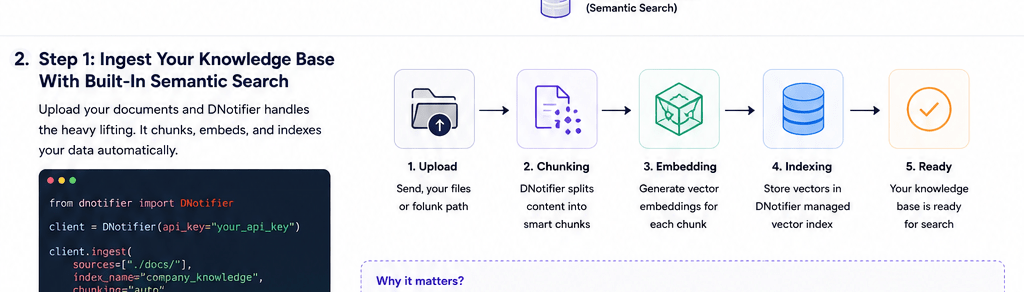
Step 1: Ingest Your Knowledge Base With Built-In Semantic Search
To ingest data, send your raw documents to the DNotifier document loader API. DNotifier automatically splits your files, creates vector embeddings, and stores them in a managed vector store. You do not need to configure manual chunking parameters or external vector index settings.
Indexing your data is usually the hardest part of building RAG. Traditional tools force you to tweak chunk sizes and overlap percentages manually. If your chunk size is wrong, your AI misses critical context.
DNotifier automates this entire chunking and embedding pipeline. You simply pass your file path or raw text string to the SDK. The platform parses the text, generates embeddings, and indexes everything instantly. Your data is immediately searchable for real-time queries.
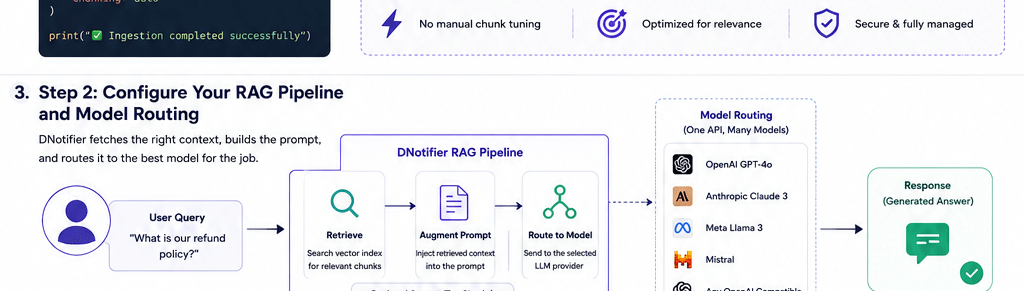
Step 2: Configure Your RAG Pipeline and Model Routing
You configure a DNotifier RAG pipeline by pairing your semantic search index with an LLM. The DNotifier AI orchestration framework receives user queries, fetches context, and routes prompts to your target model. You can swap between OpenAI, Anthropic, or open-source models using a single unified API.
This step is where the retrieval magic actually happens. When a user asks a question, DNotifier queries your indexed data first. It finds the top matching text chunks using semantic similarity.
Then, DNotifier injects those chunks directly into the system prompt. It routes the enriched prompt to the model you selected. Because DNotifier acts as an AI middleware layer, switching models requires zero code changes. If OpenAI has an outage, you can instantly route requests to Claude or Llama.
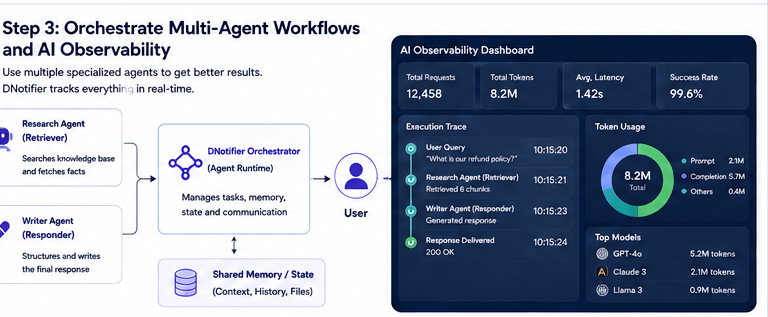
Step 3: Orchestrate Multi-Agent Workflows and AI Observability
For complex tasks, use DNotifier multi-agent workflows to divide research and drafting duties. One agent retrieves data from your knowledge base while another agent structures the final response. DNotifier provides full AI observability, tracking token usage, latency, and tool calls across every agent.
Single-agent systems often break when tasks require multiple steps. A single prompt trying to retrieve data and write a formal report often fails. Using an AI agent framework lets you build specialized agents that collaborate.
For example, your AI research agent pulls raw policy facts from your database. Then, your AI writer agent turns those facts into a clean customer response. DNotifier manages state and memory between both agents automatically. You can view the full execution trace in the DNotifier dashboard to debug issues fast.
Frequently Asked Questions
Is DNotifier good for production AI agents?
Yes, DNotifier is built specifically for production AI agent systems. It provides 99.9% SLA uptime, token-level tracing, real-time pub/sub messaging, and enterprise security out of the box.
Do I need a separate vector database for RAG with DNotifier?
No, you do not need an external vector database. DNotifier includes built-in semantic search and managed vector indexing inside its unified platform.
Can I build multi-agent systems with DNotifier?
Yes, DNotifier natively supports multi-agent workflows and real-time agent communication. You can easily coordinate specialized agents to handle complex enterprise automation tasks.
Building a production-ready RAG application does not have to be complicated. DNotifier eliminates infrastructure headaches so you can focus on building great AI features. Ready to streamline your AI stack? Visit dnotifier.com today and explore the SDK to build your first AI agent.

