Try building AI agents from scratch and you’ll hit the same wall every team hits. You need a model router. An orchestration layer. Some kind of vector database. A message queue. And a way to figure out why an agent just… stopped, mid-task, for no obvious reason.
Most teams end up gluing five different tools together before they’ve written a single line of actual product logic. It’s not fun.
DNotifier is built to be the plumbing underneath all of that. One AI agent infrastructure platform instead of five vendors, so your team can spend time on what the agents actually do rather than how they talk to each other.
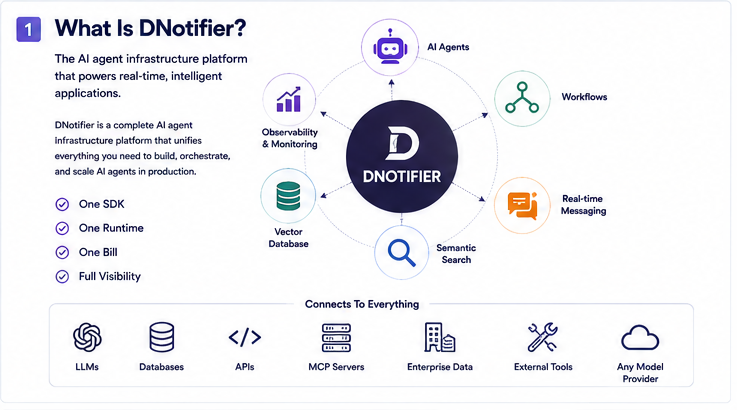
Here’s the rundown.
The Problem Nobody Talks About Until They Hit It
Every AI-native app needs the same basic stuff eventually. A way to call different models. A way to get agents coordinating. Semantic search that actually works. Real-time updates pushed to users. Teams build these one at a time, usually with a different vendor for each, because that’s just how the tooling landscape looks right now.
It works, until it doesn’t. Latency sneaks in from all the extra hops between services. Bills get weird and unpredictable. And when an agent fails, you’re stuck flipping between three dashboards that have no idea the others exist.
DNotifier folds all of it into one runtime. One SDK, one bill, one place to actually trace what happened.
Three Layers, Stacked
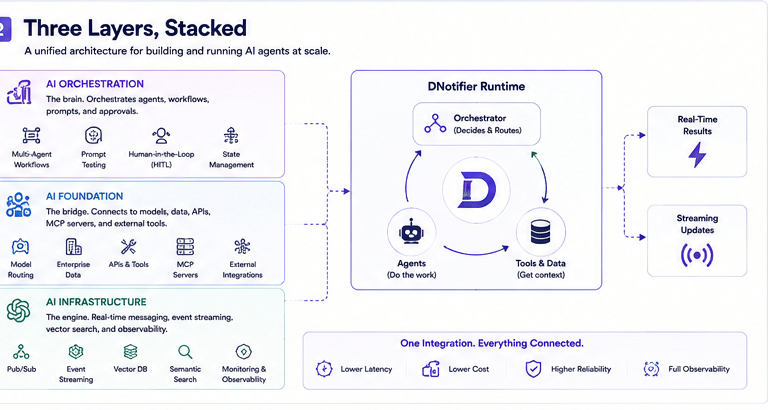
DNotifier’s architecture is three layers, each one building on the last.
AI Foundation is the base. It connects your app to models, enterprise data, APIs, MCP servers, and outside tools. Model routing lives here, and the whole point is you’re not stuck with one provider forever.
AI Orchestration sits on top. This is where multi-agent workflows happen, along with prompt testing and human-in-the-loop approvals. Basically, this is the layer deciding what happens next.
AI Infrastructure is the runtime. Real-time messaging, Pub/Sub, event streaming, agent monitoring. Everything you need to actually run this stuff in production and know what it’s doing while it runs.
Put together, this means no separate vector database, no separate Redis for pub/sub, no bolted-on observability tool. One integration instead of four.
Features Worth Actually Knowing About
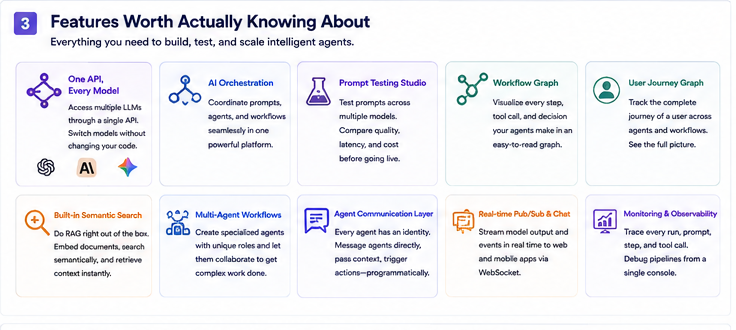
One API, every model. Hook up once, then switch between GPT-4o, Claude, Gemini, whatever, without rewriting your app each time. Handy when a cheaper or faster model drops and you don’t want to redo the whole integration from scratch.
AI orchestration. Coordinate prompts, tools, agents, and workflows in one place instead of building your own orchestration logic every single time you add a new agent to the mix.
Prompt testing studio. Run one prompt across a bunch of models at once, compare response quality, latency, cost. Good way to figure out which model actually fits before you’re locked into one in production.
Workflow graph. A visual of every step an agent takes, tool calls included. Something breaks, you can actually see where instead of scrolling through logs hoping to spot it.
User journey graph. Tracks what one specific user experienced across a workflow, not just aggregate numbers that hide the actual problem.
Built-in semantic search. RAG without standing up your own vector database or indexing pipeline. Documents get embedded and searched right inside the same platform running your agents.
Multi-agent workflows. Spin up agents with their own identity and job, let them work together. Research agent hands off to a writing agent, that kind of thing, without you writing the handoff code yourself.
Agent communication layer. Every agent has its own ID. Message it directly, pass context, trigger actions, whatever you need, from outside the workflow itself.
How the Agents Actually Talk to Each Other
This is the part most teams underestimate when they try to build it themselves. DNotifier’s orchestrator routes tasks to whatever agent fits best, and agents share state in real time instead of passing messages through some external queue and hoping nothing gets lost.
A typical setup: research agent pulls information, writing agent turns it into a draft, support agent deals with user questions, analytics agent watches what’s actually working. Each one does its own job instead of one giant agent trying to be everything at once.
Turns out that specialization just works better. And when something breaks, you know which piece to look at instead of untangling one massive agent’s entire decision tree.

Who’s Actually Using This
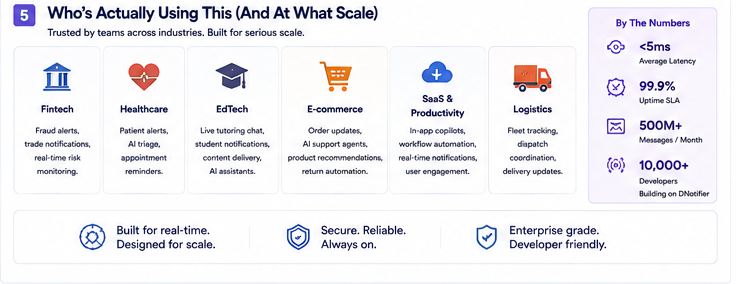
DNotifier shows up across a lot of different industries, honestly more than you’d expect. Fintech teams run fraud alerts and trade notifications through it. Healthcare products use it for patient alerts and AI triage. EdTech platforms run live tutoring chat and student notifications. E-commerce teams handle order updates and support agents. SaaS companies build copilots and in-app notifications. Logistics teams track fleets and coordinate dispatch.
Different industries, same underlying need: real-time coordination between AI agents and actual humans, at a scale where hand-built infrastructure starts falling apart.
The Numbers
DNotifier claims sub-5ms average latency, a 99.9% uptime SLA, and over 500 million messages a month across 10,000-plus developers. Take that as a signal more than a sales pitch: this thing’s built for real production traffic, not just a demo that looks good on stage.
Actually Getting Started
Setup is three steps. Install the package, initialize the SDK with your app ID and secret, connect and start receiving messages. Works with React, Next.js, Node.js, Flutter, and Python, so most teams can drop it into whatever they’ve already got without much fuss.
Basic init in JavaScript:
javascript
import { DNotifier } from 'dnotifier';const dn = new DNotifier({ appId: "your_app_id", secret: "your_app_secret", transport: "ws", userId: "current_user_id", onConnected: () => console.log('Connected'), onMessage: (data) => console.log(data.payload.toJSON()),});
From there you’re creating agents, wiring up orchestration, streaming updates to your frontend. That’s really it.
FAQs
Is DNotifier an AI agent framework?
Yeah. It’s got an agent framework built in, plus the runtime and infrastructure to actually run multi-agent workflows once you’re in production.
Do I need my own vector database?
Nope. Semantic search and RAG come built in, so there’s nothing separate to deploy or maintain on that front.
Does it lock me into one model?
No. The API layer routes across models, so switching providers doesn’t mean rewriting your app.
Is this just for enterprises, or can startups use it too?
Both. Pricing scales down to small teams, and setup’s fast enough that solo devs use it without much hassle.
How secure is it?
Supports SSO through Microsoft Entra ID, Google Workspace, and custom identity providers, which matters if you’ve already got enterprise auth set up.

