Your AI agent works great in a demo. Then real users show up. Requests pile up, a model times out, and nobody can explain why an answer went wrong.
That gap between demo and production is where most teams get stuck. DNotifier AI agent infrastructure closes it. You get one SDK and one API to run, connect, and watch your agents. Here is how it works, step by step.
What Is DNotifier AI Agent Infrastructure?
DNotifier AI agent infrastructure is the layer under your agents. It handles orchestration, messaging, search, and monitoring through one SDK and one API. You write the agent logic. DNotifier keeps it running reliably once real traffic arrives.
Most teams glue together five or six separate tools. A queue here, a logging tool there, a search service somewhere else. Each one needs setup, and each one can break.
DNotifier AI infrastructure puts those pieces in one place. It also supports multiple models, so you can change providers without rewriting your app.
Why Production AI Needs More Than a Good Prompt
Production AI needs reliability, visibility, and speed. A good prompt only gets you a first draft. Real traffic brings failures, slow replies, and unclear errors. You need tools that route work, recover from problems, and explain every decision.
That is why DNotifier production AI focuses on the whole system, not just the model call. The model is one part. Everything around it decides whether users trust your product.
How DNotifier AI Agent Infrastructure Works, Step by Step
Think of it as eight steps. You can adopt them in order or pick the ones you need today.
Step 1: Connect Through One SDK
You start by installing the SDK and connecting your app to the API. That single connection gives you access to every feature. There are no separate accounts or clients for each tool.
This matters because setup time drops fast. Your team spends less energy on wiring and more on the product itself.
Step 2: Orchestrate Your Models and Agents
DNotifier orchestration decides which agent or model handles each request. It routes work, passes context along, and keeps the flow organized. Multi-model support means one agent can use one model while another uses a different one.
You stay in control of the logic. DNotifier handles the traffic.
Step 3: Build Repeatable Workflows
Next, you link tasks into AI workflows. A workflow might take a user question, search your data, draft an answer, and check it. Each step runs in order.
Workflows turn one-off scripts into something your whole team can reuse and improve. They also make behavior predictable, which helps in production.
Step 4: Add More Agents When You Need Them
Some jobs are too big for one agent. A DNotifier multi-agent platform lets several agents split the work. One researches, one writes, and one reviews.
They pass results to each other through the same system. You add agents as your product grows, without redesigning everything.
Step 5: Make Agents React to Events
Here is where DNotifier event-driven agents shine. Real-time pub/sub lets agents publish and subscribe to events. An agent wakes up when something happens, like a new message or a finished task.
This beats constant polling. Your agents respond right away, and your system stays light. It also powers chat systems, where users expect instant replies.
Step 6: Give Agents Better Context With Semantic Search
Agents give weak answers when they lack context. Semantic search fixes that. It finds information by meaning, not just exact words.
Your agent can pull the right document or past conversation before it responds. Answers become more accurate, and users notice the difference.
Step 7: Test Prompts Before You Ship
Prompt testing lets you try changes before real users see them. You compare outputs, spot weak answers, and fix them early.
Small prompt edits can change results in surprising ways. Testing gives you confidence that an update helps instead of hurts.
Step 8: Monitor and Trace Everything
Once you go live, monitoring and observability show how your agents behave. You can watch performance, spot errors, and see problems as they happen.
Traceability goes one level deeper. It lets you follow a single request through every agent and step. When an answer looks wrong, you find the cause in minutes instead of guessing.
Who Benefits Most From a DNotifier Agent Platform?
A DNotifier AI agent platform helps any team moving from prototype to production. Small teams save time because they skip building infrastructure. Larger teams gain a shared system that keeps every agent visible and consistent.
It fits startups launching a first AI feature. It also fits teams already running several agents that have become hard to manage.
If your stack feels like a pile of tools that barely talk to each other, that is a good sign you need better DNotifier agent infrastructure.
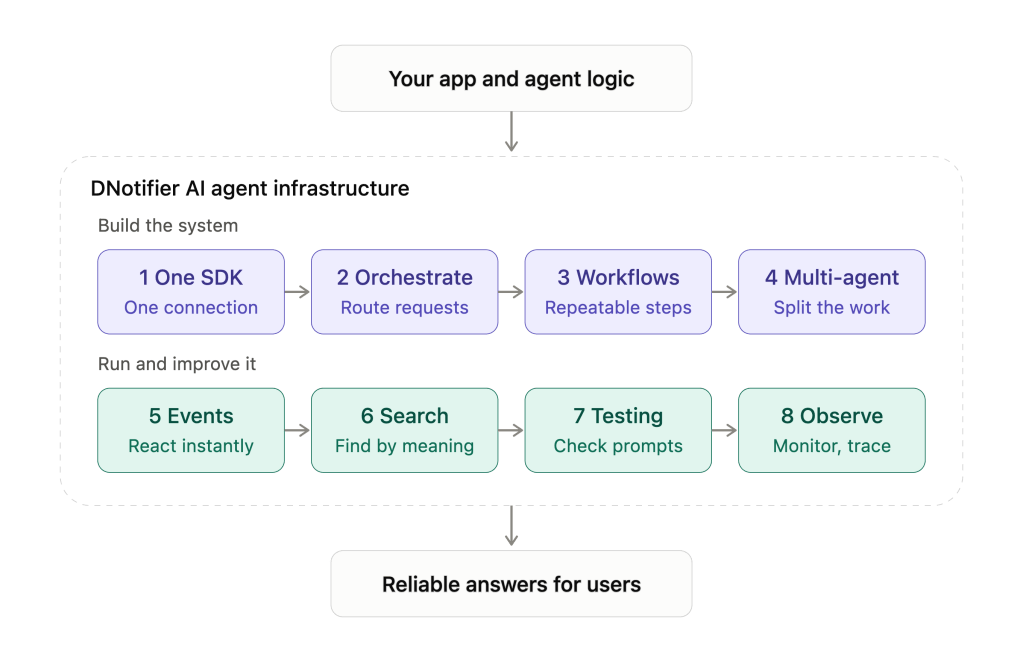
Here is how to read it.
Your app sits at the top and connects to DNotifier through one SDK. Inside, the eight steps fall into two groups.
Purple row: build the system
- One SDK: you connect once and get every feature.
- Orchestrate: DNotifier routes each request to the right agent or model.
- Workflows: you chain tasks into steps your team can reuse.
- Multi-agent: several agents split a big job and pass results along.
Teal row: run and improve it
5. Events: agents react the moment something happens, so they don’t poll.
6. Search: agents find the right context by meaning before they answer.
7. Testing: you check prompt changes before real users see them.
8. Observe: you monitor live behavior and trace any request end to end.
The two colors show that the first four steps set up your agents and the last four keep them healthy in production. Users get reliable answers at the end.
Start Small, Then Scale
You do not need to adopt everything at once. Begin with orchestration and monitoring. Add workflows, pub/sub, and semantic search as your needs grow.
DNotifier AI agent infrastructure gives you one steady foundation. Your agents stay reliable, your team stays informed, and your users get better answers.
Ready to try it? Visit dnotifier.com and explore the SDK.

