Your agent passed every test. Then production happened. It kept calling one tool in circles, ran up a token bill nobody expected, and told a customer something flat-out wrong. The dashboard? Green. Every light.
Yeah, that’s the gap agent observability fills. Uptime checks tell you a service is alive. They say nothing about why an agent made a bad call. Below are the llm agent telemetry signals and monitoring best practices worth your time, plus a few things you can skip.
What Is Agent Observability?
Agent observability means being able to see what an agent did, why it did it, and what it cost. You gather traces, metrics, and logs from every step. Then you use them to explain any result, good or bad.
Regular apps follow set code paths. Agents don’t. The model picks its next move on the fly, so the same request can take two different routes. A status code can’t explain that.
That’s why agent observability treats a run like a story with steps. Read the story, and you can see where it went off the rails.
Why Logs Fall Short
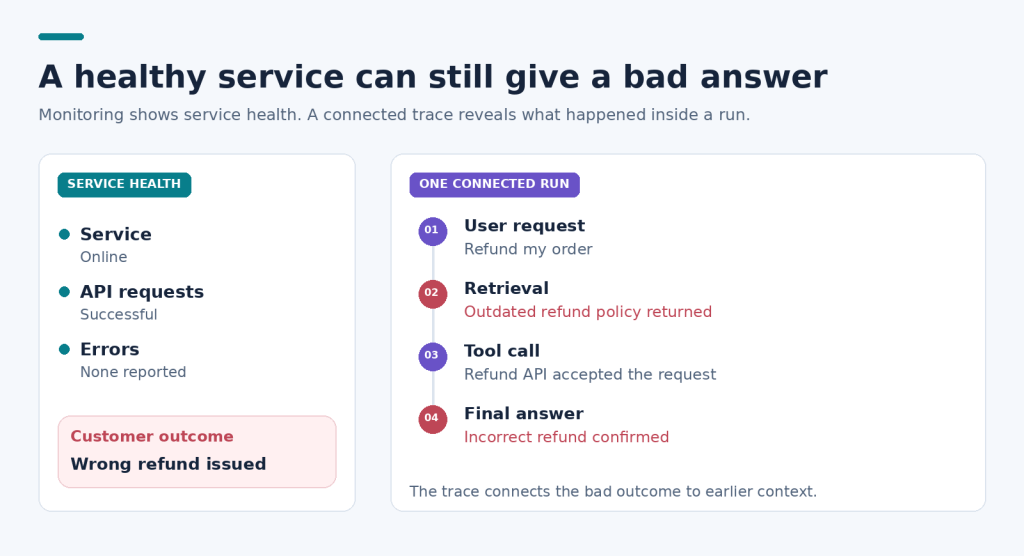
Logs capture events, not decisions. One line says a tool got called. It won’t say why the agent picked it, or what it had just read.
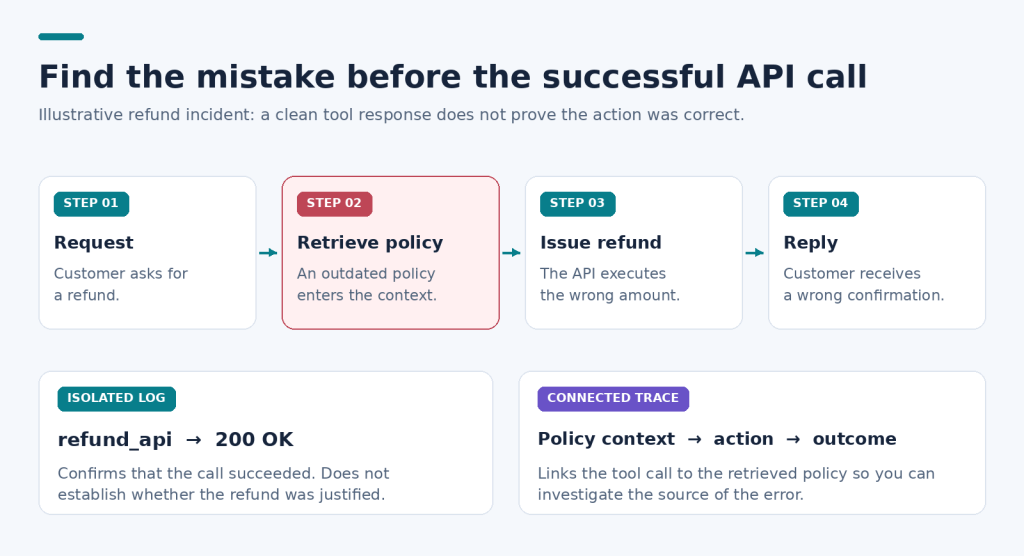
Say a support agent issues the wrong refund. The logs show a clean API call, nothing odd. The real mistake sits three steps earlier, in a bad search result. Without the whole chain, you’d never spot it.
Solid agent observability links those steps together. You follow one request from first prompt to final answer. Nothing falls through the cracks.
Signals That Matter
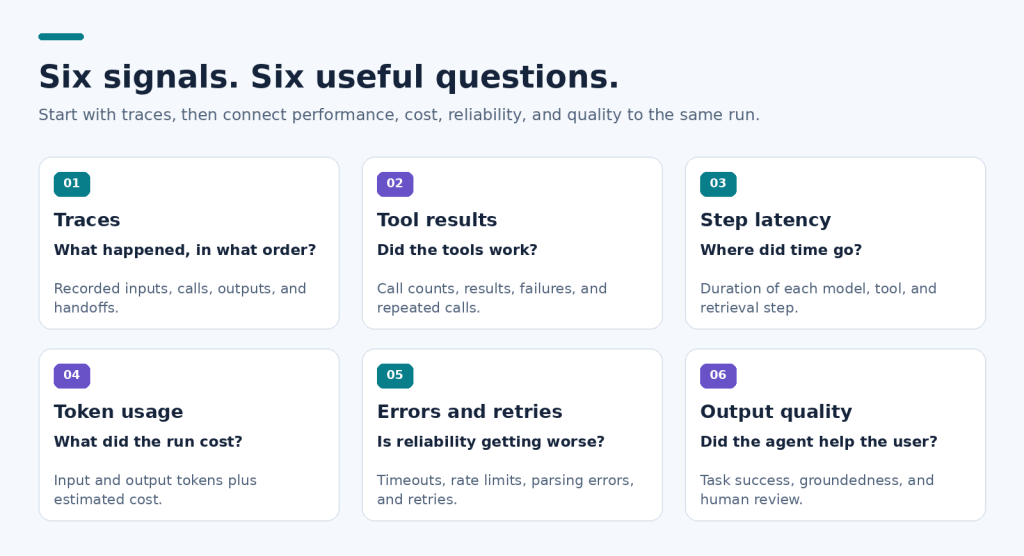
Six signals do most of the work: traces, tool call results, step latency, token usage, error rates, and output quality. They tell you what the agent did, how fast, what it cost, and whether the answer was any good. Start there. Add more later.
Traces come first. A trace records every step of one run: prompts, model calls, tool calls, handoffs. Skip it and the other signals float with no context. It’s the backbone of agent observability.
Tool calls come next. Track which tools fire, how often, and whether they work. The same tool called again and again usually means a loop. A failed call often explains a weird answer.
Latency needs a per-step view. Total response time hides the slow bit. One sluggish retrieval can drag a whole run, and you’d never know from the average.
Then there’s cost. Tokens are money. Count them per run, per agent, per user. Your CTO will want this for forecasting. You’ll want it to catch a prompt gone wild.
Errors and retries matter too. Timeouts, rate limits, broken outputs. When retries start climbing, something’s brewing. It usually shows up before users complain.
Quality is the tricky one. Score answers with test sets, human review, or fact checks. An agent can be fast, cheap, and wrong.
Running several agents? Watch the handoffs. Log what went across and what came back. Lots of failures hide at those seams.
Monitoring Best Practices
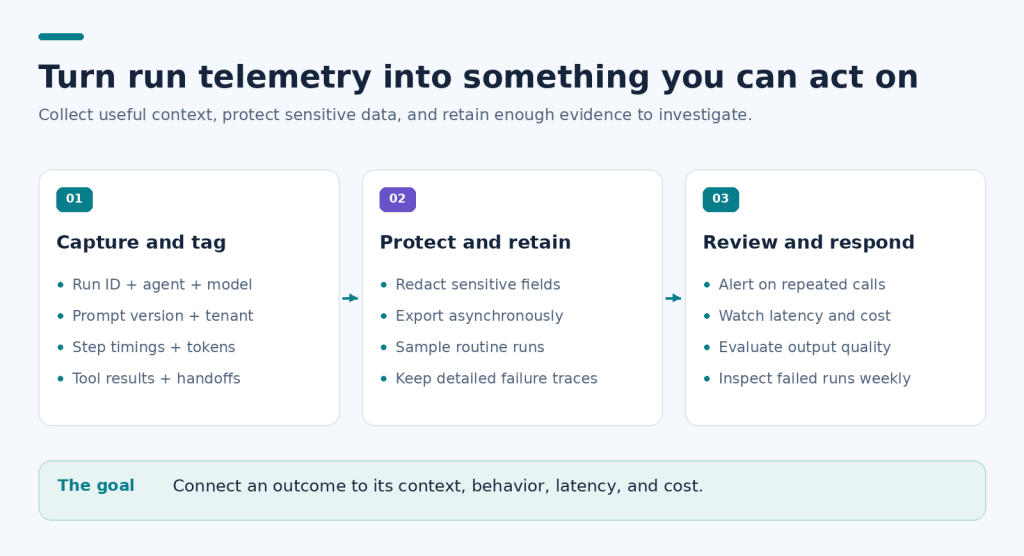
A few habits cover most of it: instrument early, tag every run, alert on behavior, and review real traces. Do these four things and most production surprises become easy to diagnose.
Instrument from day one. Adding telemetry after an incident hurts. Agent observability is cheap early and expensive late.
Tag every run. Give each run an ID. Add the agent name, model, prompt version, and tenant. Then when something breaks, you can ask which prompt version caused it and get a real answer.
Alert on behavior. A run can finish with zero errors and still fail the user. Set alerts on loop counts, cost spikes, and quality scores. Not only on crashes.
Redact sensitive data. Traces hold prompts and outputs. Those may include customer details. Mask them before storage, and settle this with your security team early.
Review traces weekly. Dashboards show trends. Traces show reasons. Pick a few failed runs each week and walk through them. You’ll learn more than any chart can teach.
One honest trade-off: more telemetry means more storage and more cost. Sample your low-risk runs. Keep full traces for failures and anything expensive.
Where DNotifier Fits
DNotifier gives you one SDK and one API for orchestration, workflows, and multi-agent systems. Monitoring, observability, and traceability sit in the same place. So agent observability doesn’t mean gluing three tools together just to see what an agent did.
Prompt Testing helps on the quality side. You can try a prompt change before release, rather than hearing about it from a user.
FAQ
How is agent observability different from monitoring?
Monitoring tells you something broke. Observability helps you work out why. Monitoring watches known numbers like uptime and errors. Observability lets you ask new questions, using traces and context.
Which signal should I track first?
Start with traces. They give every other signal its context. After that, add token usage and tool call results, since those catch the most common problems.
Does telemetry slow agents down?
Usually the overhead is small if you send data in the background. Test it on your own workload before rolling it out everywhere.
Final Thought
Agents will keep surprising you. Good agent observability just means you hear about it first. Curious how this works in practice? Explore the SDK at dnotifier.com.

