Your agent nailed the demo. Then real users showed up. It picked the wrong tool, looped for ten minutes, and nobody could tell why.
Most of the time the model isn’t to blame. The code wrapped around it is. That code is the harness, and building it well is harness engineering.
This post walks through the patterns that actually help. Nothing fancy.
What Is Harness Engineering?
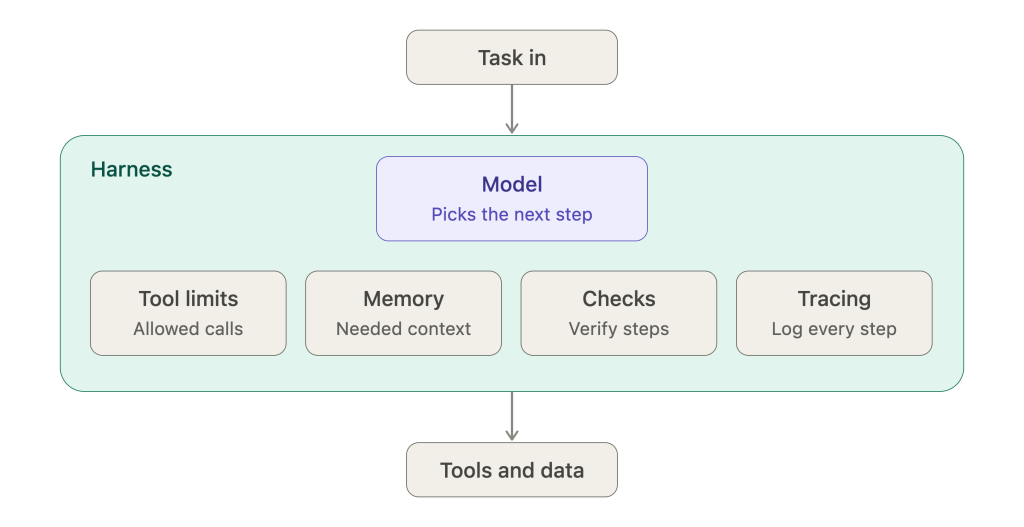
Harness engineering is the work of building everything around a model that keeps it safe and useful. Tools, limits, memory, checks, logs. The model decides what to do. The harness decides what it’s allowed to do and writes down what happened.
Picture a horse and a cart. The horse has all the power. The harness points it one way and keeps the cart attached. Models work like that. Smart, sure, but they need something steering them.
Here’s the rough shape (use the diagram from the earlier draft here):
Everything in the teal box is your job. The model only picks the next step.
Why Agents Break Without One
Agents break because models are hard to predict and the world around them is messy. A tool times out. A prompt gets too long. The model repeats itself. One small slip, and you’ve got a stuck run or a bad action no one notices.
Here’s what usually goes wrong:
- Loops that never end and eat your budget
- A wrong tool call that changes real data
- Context so long the model forgets the task
- Errors that vanish and leave nothing to debug
Each of these has a fix. Five of them, actually.
Five Harness Engineering Patterns
Five patterns cover most of it: narrow tool access, loop limits, tidy memory, checks on every step, and tracing. None are clever. But together they turn a lucky demo into something your team can run daily without babysitting it.
1. Narrow tool access
Hand each agent only the tools it needs. A support agent has no business deleting records. Describe every tool plainly, and check inputs before a call runs. Fewer tools, fewer wrong picks.
2. Loop limits
Set a step cap, a time cap, and a spend cap. Hit one? Stop and hand off to a person. A clean stop beats a ten-minute spiral.
There’s a catch. Tight limits cut off some good runs too. Start loose, then tighten once you’ve seen real data.
3. Tidy memory
Don’t paste the whole history into every prompt. Keep what the next step needs and park the rest somewhere else. Pull it back only when asked for. The model stays focused, and your bill drops.
4. Checks on every step
Look at the output before acting on it. Is the JSON valid? Is the number in range? For risky actions, put a human in the loop. A check costs little. Skipping one can cost a lot.
5. Tracing
Log every model call, tool call, and result, in order. When a run fails, read the trail. No guessing. Tracing also shows which step runs slow or costs the most. If you can’t see it, you can’t fix it.
Harnessing It With DNotifier
Harness engineering is easier when the parts live in one place. DNotifier gives you one SDK and one API, with support for multiple models. No juggling five separate tools.
Here’s how it lines up with the patterns:
- Orchestration and workflows set the steps and their order
- Multi-agent systems use real-time pub/sub, so agents can message each other
- Prompt testing lets you check a change before it ships
- Monitoring, observability, and traceability show you each step of a run
- Semantic search pulls the right context into memory
Use what the job needs and skip the rest. Harnessing these parts together beats gluing them by hand.
Where to Begin
Start with loop limits and tracing. They’re quick to add and catch most early trouble. Next, put checks on your riskiest tool. Tune memory last, after you’ve watched some real runs.
One pattern at a time. Read the traces after each. You’ll see what helps and what’s just extra weight.
FAQ
What is harness engineering in simple terms?
It’s building the controls around a model so it behaves. Tools, limits, memory, checks, logs. The model thinks. The harness keeps it in line.
Do I need a harness for a simple agent?
Yes, a small one. Even an agent with a single tool needs a step limit and a log. Add more as it gains tools and users.
How do I know my harness is working?
Runs finish, fail cleanly, and leave a readable trail. Watch step counts, cost per run, and failed tool calls. If those hold steady, you’re in good shape.
Is harness engineering the same as prompt engineering?
No. Prompt engineering shapes what you tell the model. Harness engineering shapes what it can do and see. A good prompt helps, but it can’t stop a loop or log a failed call.
Final Thought
A model gives you the power. A harness decides where it goes. Build that part first, and harnessing agents gets way less stressful. When you’re ready to try these patterns, explore the SDK at http://www.dnotifier.com.

