You’re in a vendor demo. The slide says “agent platform.” The agent runs, the tools fire, and everything looks fine. Then you ask who manages ten agents in production, and the room goes quiet.
That gap is the whole story. Many teams buy an agent harness and expect a control plane. The two sound alike, but they solve different problems. This post helps you tell them apart before you sign anything.
What Is an Agent Harness?
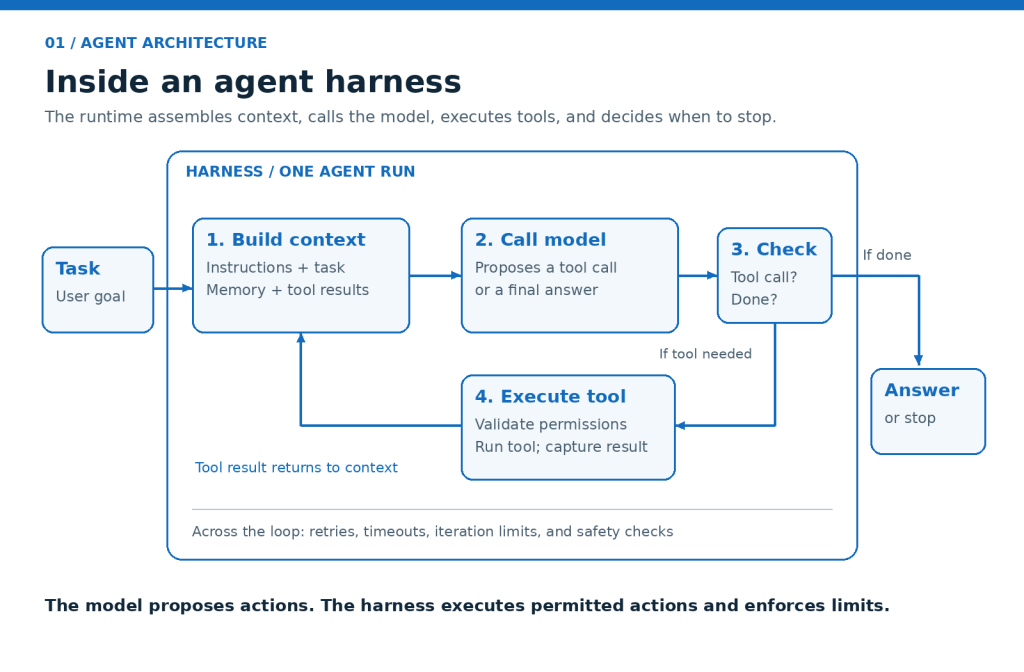
An agent harness is the code that runs a single agent. It wraps a model with a loop, tools, memory, and guardrails. It decides what the model sees, which tools it can call, and when to stop.
Think of it as the engine for one agent. A good one usually handles:
- Prompt and context assembly
- Tool calls and their results
- Short-term memory for the current task
- Retries and stop conditions
- Basic safety checks
Most developers build one early, often by accident. A while loop that calls a model and runs a tool is already a small version of one.
What Is a Control Plane?
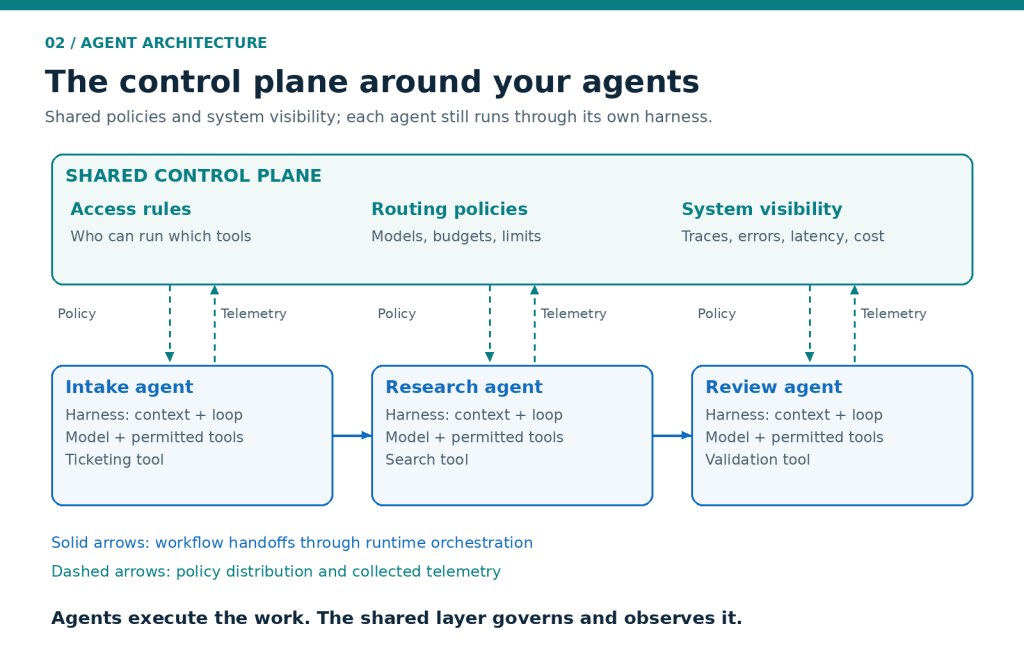
A control plane manages many agents from one place. It sets the rules for routing, access, and monitoring. It doesn’t do the thinking for any agent. It directs and watches the agents that do.
Cloud teams know this idea well. The control plane decides, and the workers do the work. For agents, that means:
- Routing requests to the right model
- Coordinating handoffs between agents
- Monitoring latency, errors, and cost
- Tracing every decision from start to finish
- Controlling who can run what
Agent Harness vs Control Plane
Here’s the quick comparison.
| Harness | Control plane | |
|---|---|---|
| Scope | One agent | Many agents |
| Main job | Run the loop | Direct and observe |
| Where it lives | Inside your agent code | Around your agents |
| Typical owner | Developer | Platform or architecture team |
| Fails when | An agent loops or misuses a tool | Agents conflict, drift, or go unseen |
| Question it answers | “Does this agent work?” | “Is the whole system healthy?” |
Visual idea: Draw three agent boxes, each with its own small harness. Place one wide control layer underneath all three. Readers will see the difference at a glance.
Why Teams Confuse the Two
Vendors use the words loosely. A product that runs a loop gets called a platform. A dashboard gets called a harness.
Demos also hide the problem. One agent doesn’t need a control plane. Trouble starts at agent number three. Then someone asks for audit logs, and your agent harness has none.
When a Harness Is Enough
Early projects don’t need more. If you run one agent, own the code, and can read the logs yourself, a solid agent harness does the job. Spend your time on tools and prompts instead.
You’ve probably outgrown it when:
- You run more than two agents
- Another team asks for audit trails
- You switch models often
- Nobody can explain a failure quickly
Five Questions to Ask Before You Buy
- How many agents can it manage at once?
- Can I trace one decision from prompt to tool call?
- Who controls model routing, my code or a rule?
- What happens when one agent hands work to another?
- Where do logs, errors, and cost show up?
If most answers say “inside your own code,” you’re buying a harness. If they point to a shared layer, you’re buying a control plane. Neither is wrong. They just aren’t the same purchase.
A Quick Example
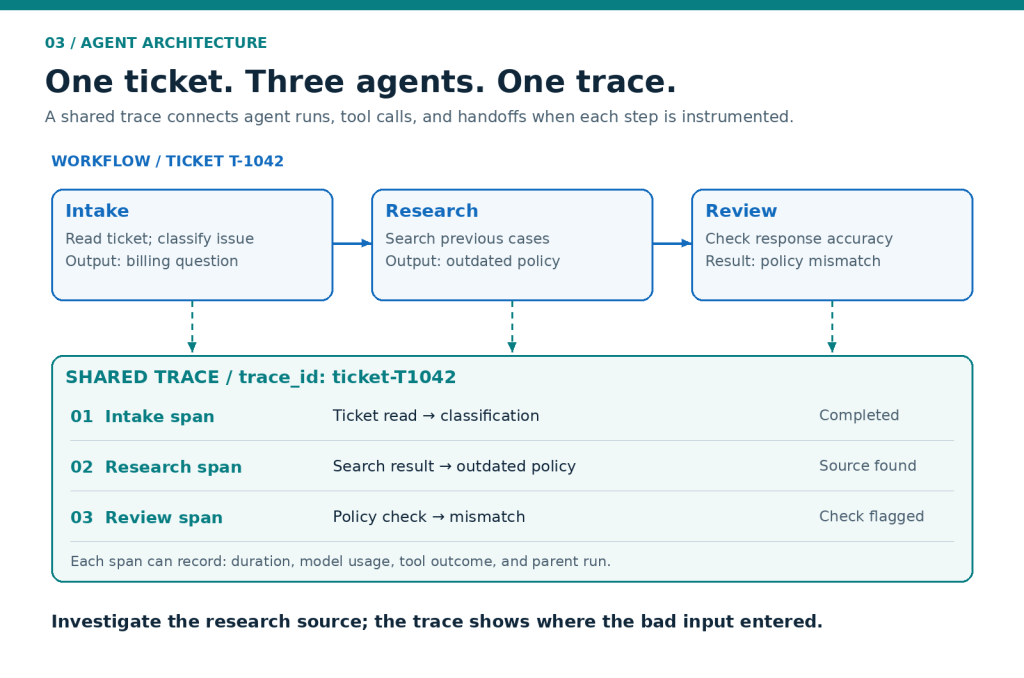
Picture a support workflow with three agents. An intake agent reads tickets. A research agent searches past cases. A review agent checks the final reply.
Each one gets its own agent harness, and that works well. Each loop runs, calls its tools, and stops cleanly.
Then a ticket fails at the review step. Who caused it? Did research return bad data, or did intake misread the ticket? Without a control plane, you dig through three separate logs. With one, you follow a single trace.
There’s a trade-off. A control plane adds setup time and one more layer to learn. For a single agent, skip it. For several agents, it usually earns its place.
The Control Side With DNotifier
DNotifier focuses on the control side of the stack. You get one SDK and one API, with support for multiple models.
Here’s how its features map to the problems above:
- AI Orchestration coordinates models and workflows.
- Multi-Agent Systems handle coordination between agents.
- Monitoring & Observability show how your agents perform in production.
- Traceability follows the path behind each decision.
You still choose how each agent thinks. DNotifier handles the layer around them, so you aren’t stitching together separate tools for routing, logs, and traces.
FAQ
Is an agent harness the same as an agent framework?
Not quite. A framework is a toolkit for building agents. The harness is the runtime that executes one. Some frameworks include a harness, and some leave it to you.
Do I need a control plane for one agent?
Usually no. A single agent needs a solid runtime and basic logs. Add a control plane when you run several agents or need audit trails.
Can I build a control plane myself?
Yes, but plan for real effort. You’ll need routing, tracing, access rules, and dashboards. The upkeep is easy to underestimate.
What breaks first without a control plane?
Visibility. You can’t see why an agent failed or what it cost. Debugging turns into reading logs by hand.
Final Takeaway
Know which layer you’re paying for. An agent harness runs one agent well. A control plane keeps many agents under watch. Ask the five questions, and you’ll know what’s in the box.
Curious how DNotifier handles the control side? Visit http://www.dnotifier.com or explore the SDK.

