Say you’ve built one agent. It runs fine. Then you add a second one, a document store, a chat feed, a dashboard. Suddenly you’re gluing five tools together and none of them agree on who sent what.
That’s the problem the DNotifier agent platform API goes after. One SDK. One API. A fairly short list of calls. Let’s walk through what’s in it so you can tell if it fits your stack.
Is the DNotifier Agent Platform API?
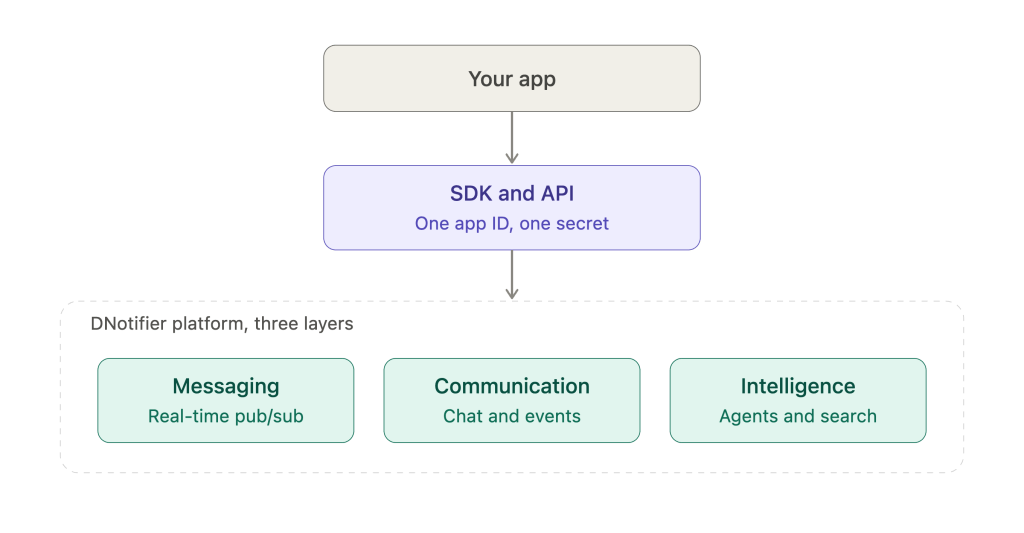
The DNotifier agent platform API is one interface for messaging, agents, workflows, document search, and run tracking. You get in through an SDK with a single app ID and secret. Multiple models sit behind it.
DNotifier describes the platform as three layers. Messaging covers real-time pub/sub. Communication handles chat and event streams. Intelligence is where agents and knowledge search live (DNotifier website). Picture them stacked under your app. Everything runs through one central platform, so every message and run goes through a system you can watch.
Trade-off time. Workflows run step by step. Runs stay predictable, but you give up some flexibility.
Longer pipelines work the same way. The Dart docs show a blog writer that creates, refines, and optimizes a post. The first agent stores its draft in shared state, and later steps build on it.
If something’s misconfigured or a run fails, the Dart SDK throws a WorkflowError. Catch it and you know whether setup or runtime went wrong.
Searching Your Knowledge Base
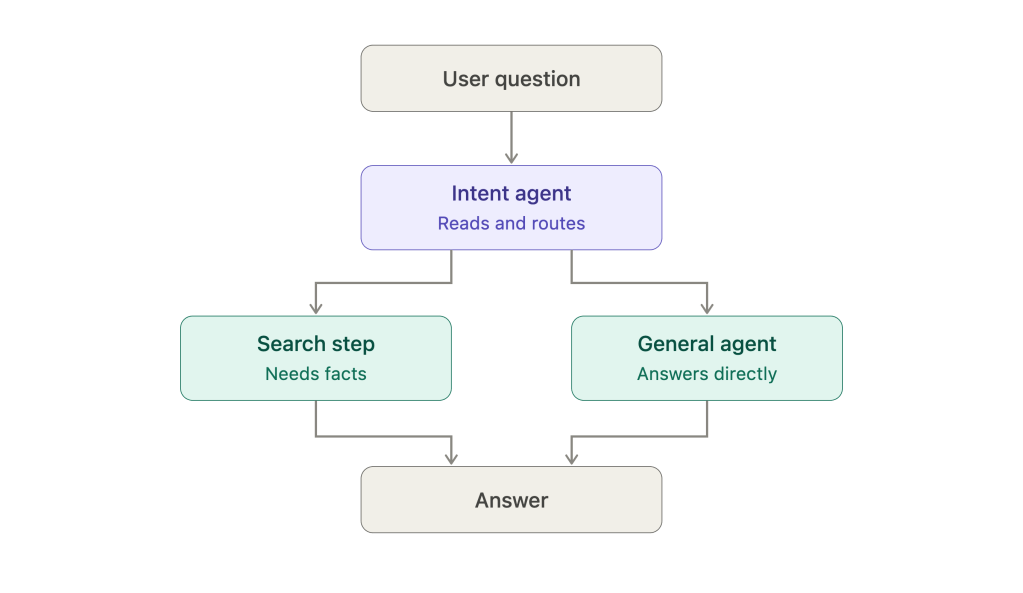
There’s a document store built in. Add documents, edit them, pull them back, delete them. Search goes by meaning, so a query doesn’t have to match exact words.
Fetching a single document returns the document plus its chunks. That’s handy when you want to check how your text was split. Listing takes a limit, an offset, and a type, so paging through a big set stays easy.
The Dart SDK search call takes a result limit and a minimum similarity score. Raise the score and weak matches never reach your agent. You can also filter by source.
API Surface at a Glance
The DNotifier agent platform API keeps its method list short. For a team onboarding fast, that helps.
| Area | What you do | Example calls |
|---|---|---|
| Connection | Authenticate, open a transport | connect(), disconnect() |
| Messaging | Send real-time messages | send() |
| Workflows | Run named agents in order | run_workflow() |
| Knowledge base | Store and search documents | add_document(), search() |
| Chat history | Fetch or delete messages | delete_chat_history_message() |
| Limits | Read plan limits | get_plan_limits() |
Tracking Runs With Observability
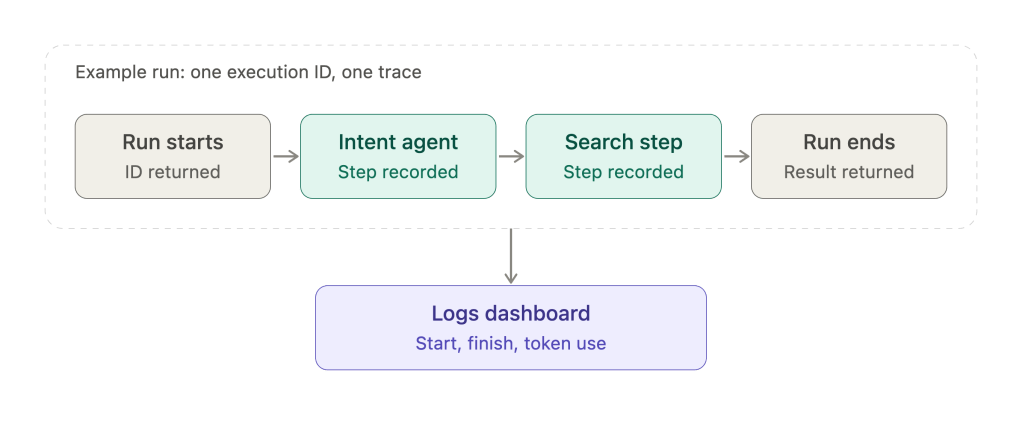
Monitoring lives inside the DNotifier agent platform API, so you don’t add a separate tool. Set observability=True on a workflow. Each run now comes back with an execution ID, and calls like send_ai() get recorded as steps.
You can also set logs=True. Then DNotifier sends session start, finish, and token use to its logs dashboard. So when a run goes wrong, you open the trace instead of guessing. A traced run might look like this.
The execution ID is the handle. Save it with your support ticket or your own logs, and anyone on the team can find the same run later.
Who Benefits Most
Architects get one contract for messaging, agents, and search. Developers get a small method list and SDKs in Python and Dart. CTOs end up with fewer tools to buy and lock down. Broadly, the DNotifier agent platform API trims the moving parts for everyone on that list.
FAQ
What does the DNotifier agent platform API cover?
It covers real-time messaging, agents, workflows, a document store, semantic search, and run tracking, all through one SDK.
Which languages have an SDK?
Python and Dart, which includes Flutter. You’ll find them on PyPI and pub.dev.
Do I need WebSockets?
No. WebSocket handles real-time messages, and HTTP covers request-style calls like agents and retrieval.
How do I see what a workflow did?
Turn on observability for it. Every run returns an execution ID, so you can look at its steps.
Wrapping Up
A platform API should leave you with fewer tools, not more. The DNotifier agent platform API folds messaging, agents, search, and monitoring into one SDK. Start with one small workflow and see how it feels.
When you’re ready, visit http://www.dnotifier.com and look through the SDK.

